
Authentication
All API requests must be authenticated. Angelcam supports two methods:
- OAuth2 — for integrations and commercial use
- Personal Access Token — for personal/development use only
OAuth2
Section titled “OAuth2”OAuth2 produces a short-lived Bearer token. Pass it with every request:
curl -H "Authorization: Bearer ACCESS_TOKEN" \ -X GET "https://api.angelcam.com/v1/cameras/?limit=5"Tokens expire after 10 hours and must be refreshed using a refresh token. Refresh tokens are valid for 30 days and single-use — a new one is issued on each refresh.
Create your OAuth2 app in the MyAngelcam Dashboard to get your Client ID and Client Secret.
Password grant type
Section titled “Password grant type”Your app collects the user’s credentials and exchanges them directly for a token.
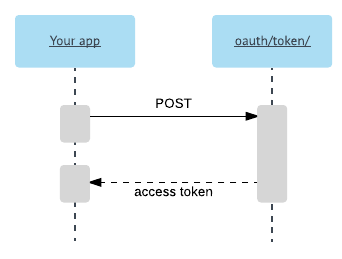
Important: Never store the user’s password. For “remember me”, store the refresh token instead.
curl -X POST https://my.angelcam.com/oauth/token/ \ -d "client_id=CLIENT_ID&scope=user_access&grant_type=password&username=user%40example.com&password=PASSWORD"Response:
{ "access_token": "...", "refresh_token": "...", "token_type": "Bearer", "expires_in": 36000, "scope": "read write"}Authorization code grant type
Section titled “Authorization code grant type”The user authenticates through Angelcam’s login page — similar to “Sign in with Google”. Safer, but requires a browser redirect.
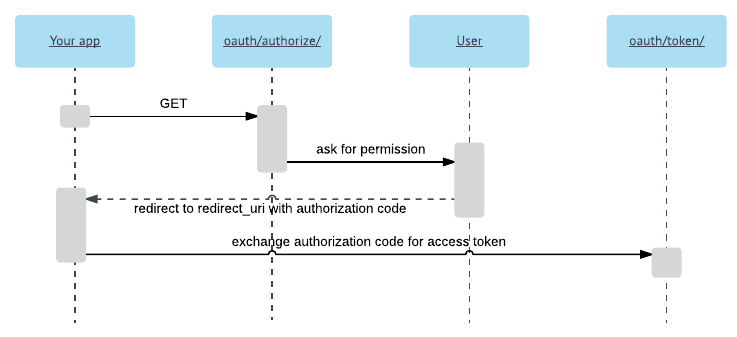
Step 1 — redirect the user to:
GET https://api.angelcam.com/oauth/authorize/ ?response_type=code &client_id=CLIENT_ID &redirect_uri=https://yourapp.com/callback &scope=user_access &state=CSRF_TOKENThe user will be asked to approve your app:
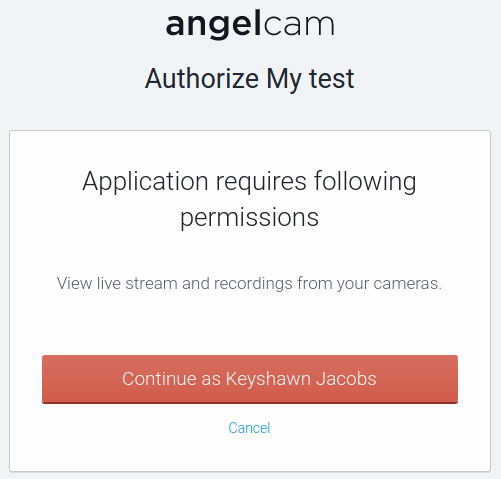
Step 2 — Angelcam redirects back to your redirect_uri with code and state. Exchange the code:
curl -X POST https://api.angelcam.com/oauth/token/ \ -F grant_type=authorization_code \ -F client_id=CLIENT_ID \ -F client_secret=CLIENT_SECRET \ -F code=AUTH_CODE \ -F redirect_uri=https://yourapp.com/callbackRefreshing a token
Section titled “Refreshing a token”When a request returns 401 Unauthorized, refresh the access token:
curl -X POST https://api.angelcam.com/oauth/token/ \ -F grant_type=refresh_token \ -F client_id=CLIENT_ID \ -F refresh_token=REFRESH_TOKENTo revoke a token, use the oauth/token-revoke/ endpoint.
Personal Access Token
Section titled “Personal Access Token”For personal use only. No expiration, but can be revoked manually.
Obtain your token in the MyAngelcam Dashboard.
curl -H "Authorization: PersonalAccessToken YOUR_TOKEN" \ -X GET "https://api.angelcam.com/v1/me/"